
Download Study Helper App For Flashcards, Quizzes, And Step-By-Step Homework Help

Download study helper app options when you want one place to solve homework questions, build AI flashcards, and practice with quizzes. HomeworkO is designed as a responsible AI homework helper that supports step-by-step learning across subjects instead of simply dumping final answers.
> Definition: HomeworkO is an AI homework helper that provides step-by-step answers, writing support, flashcards, and quizzes for students.
- Use a study helper app download when you want homework help, flashcards, quizzes, and study guides in one workflow.
- The best AI study apps explain the steps, then help you turn what you learned into review materials.
- Check device access, privacy, subject coverage, and academic integrity features before relying on any download.
HomeworkO is an AI homework helper that provides step-by-step answers, writing support, flashcards, and quizzes for students. This guide explains how to choose and download a study helper app for flashcards, quizzes, homework review, and day-to-day study planning.
Quick answer: A study helper app can combine flashcards, quizzes, study guides, and step-by-step homework review in one workflow. Students should look for clear explanations, active recall tools, safe download sources, and academic integrity settings that support learning instead of simply copying answers.
How the study helper apps look
Side-by-side captures of the compared products. Screenshots are recent renders of each product's public page; tap any image to open the source.
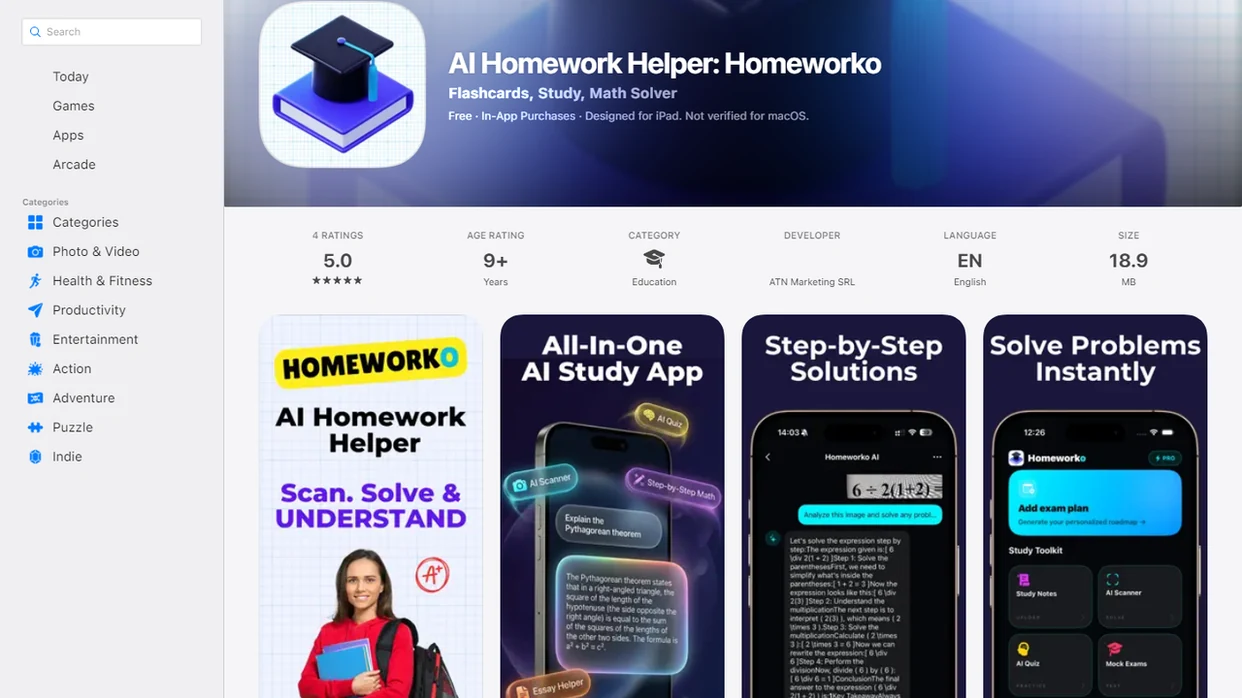
Study Helper App Download At A Glance
A study helper app download usually means web, mobile, Android, iOS, or laptop access to homework support and study practice. The useful workflow is simple: ask a question, review the steps, create flashcards, then take quizzes.
Mobile demand is real. Pew Research reported that 95% of U.S. teens had smartphone access in its 2022 teen technology survey: https://www.pewresearch.org/internet/2022/08/10/teens-social-media-and-technology-2022/.
For students who need one place to check reasoning and review later, the useful pattern is one workflow that connects step-by-step homework help with flashcards and quizzes.
The 11:47 p.m. phone photo matters. A half-finished algebra problem on lined paper should turn into an explanation, not just a final line.
HomeworkO Study App Download Features For Flashcards And Quizzes
A useful study app download should support the full learning loop, not only the moment when a student feels stuck. HomeworkO focuses on step-by-step support, writing help, AI flashcards, and quiz practice.
- Step-by-step answers: Students can ask academic questions across subjects and review the method before using the answer.
- Writing support: Drafts, outlines, explanations, thesis checks, and revision notes can help students improve their own work.
- Flashcard creation: Solved questions, class notes, or study guides can become cards for terms, formulas, dates, and mistakes.
- Quiz generation: Students can self-test before homework checks, exams, AP review sessions, or class discussion.
- Responsible AI use: The goal is to learn the process, not copy blindly.
When the issue is turning a solved problem into tomorrow’s review, the question-to-flashcard workflow matters because it keeps the explanation attached to practice.
Minimum Requirements For Study App Download Access
“Can I use a study helper app on my phone, laptop, or school device?” Check mobile app access, browser access, and login requirements before you depend on any download.
Most students should confirm four basics: stable internet, an updated browser or operating system, camera or photo upload if supported, and account access that works outside the school LMS. PC and laptop use often happens through a web browser when a native desktop app is not available.
Avoid unofficial APKs, cloned download pages, and mirror sites. That warning matters when uploaded homework, school email, or class files are involved. For platform-specific help, students can compare HomeworkO for Android with iPhone access before installing.
The old notebook beside the school login sheet is a real setup. Don’t add a risky download to it.
AI Study Helper App Mechanics Behind The Download
AI study helper apps work by taking a typed question, uploaded image, notes, or pasted class material and converting it into structured learning output. The system parses the prompt, identifies the subject, generates steps, and can transform the same content into flashcards, quizzes, or study guides.
Under the hood, image recognition and language models help interpret text, diagrams, symbols, and instructions. In plain language, the app tries to understand what kind of school task you gave it before it answers. A meta-analysis in Computers & Education found that mobile learning can improve learning outcomes, but effects vary by implementation and student use: https://doi.org/10.1016/j.compedu.2011.04.004.
Active recall is the reason flashcards and quizzes matter; retrieval-practice research shows students remember more when they practice pulling information from memory: https://doi.org/10.1111/j.1467-9280.2006.01693.x. You remember more when you retrieve an answer, not when you reread it once. However, AI can be wrong, so students should check formulas, units, and assumptions against class materials.
Study Helper App Download Workflow For Homework Review
Use a study helper app as a review partner after you have tried the work yourself. A copied final answer is weaker than a worked solution with crossed-out mistakes and a corrected method.
- Attempt the problem first or read the assignment prompt before opening the app.
- Ask or upload the question and request step-by-step reasoning, not just the answer.
- Review the explanation and mark the line where your own work broke down.
- Generate flashcards from key facts, formulas, vocabulary, units, or missed steps.
- Take a quiz and revisit every missed question before moving on.
- Check class policy before submitting anything that used AI support.
After the calculator blinks an error message, the next right move is a step-by-step review path that shows where the work broke.
Named Study App Download Shortlist For Flashcards And Quizzes
The right study app download depends on subject mix, device access, and whether the workflow supports learning instead of answer copying. Compare tools by explanations, flashcards, quizzes, study guides, and responsible learning design.
HomeworkO
HomeworkO is the first fit for students who want homework explanations, writing support, flashcards, and quizzes in one place. It is built around using the explanation, not just the final line.
StudyX
StudyX appears in the broader AI study category, so students should compare its subject coverage and review tools against their actual classes.
StudyFetch
StudyFetch is often considered for note-to-study workflows. Students should check whether the app supports both study guides and self-testing.
Gauth
Gauth is commonly associated with homework help. Before relying on it, students should review how clearly it explains steps.
StudyAI
StudyAI belongs in comparison research for AI study workflows. Verify device support, privacy terms, and quiz behavior before choosing it.
Good AI homework helper apps deliver explainable steps and practice tools, not permission to skip the assignment.
AI Flashcard App Download And Quiz App Download Workflows
“Should I download an AI flashcard app or a quiz app?” The stronger choice is often a workflow that moves from question to solution to flashcard to quiz, because practice starts from the exact material you missed.
A calculus problem can become cards for derivative rules. Biology notes can become terms and functions. A history chapter can become cause-and-effect prompts. Language vocabulary can become translation drills. A writing rubric can become revision questions before submission.
A 2023 EDUCAUSE student technology report found that daily coursework use of digital learning tools was common among college students, which helps explain why quiz and flashcard workflows now sit inside ordinary study routines: https://www.educause.edu/ecar/research-publications/2023/students-and-technology-report-flexibility-choice-and-equity-in-the-student-experience/introduction-and-key-findings. Still, installing the app is not the study session. Repeated recall, spaced review if available, and feedback from missed questions do the work. For college-heavy workloads, our homework helper for college students guide covers that higher-volume routine.
Study App Download For Android, iPhone, And PC
Android, iPhone, and PC study setups each fit a different homework moment. Phones are useful for camera capture and quick checks, while laptops are better for longer writing, file upload, and side-by-side studying.
| Platform | Good for | Practical recommendation |
|---|---|---|
| Android | Photo questions, quick review, portable quizzes | Use official app stores or the brand website. |
| iPhone | Camera capture, mobile flashcards, homework checks | Review HomeworkO for iPhone if iOS is your main device. |
| PC or laptop | Essays, PDFs, LMS tabs, longer study blocks | Use web access when no native desktop app exists. |
| Tablet | Diagrams, reading, stylus notes | Check upload and browser compatibility first. |
Students toggling between a study helper, a school LMS tab, and a PDF rubric usually work faster on a laptop. For quick formula checks, the phone wins.
Safe Study Helper App Download Checks
A safe study helper app download starts with privacy, official sources, and academic integrity. Students should know what they are uploading before they send homework, notes, or account details into any app.
- Privacy policy: Check what data is collected, stored, shared, or used to improve services.
- Account requirements: Use secure login habits, especially with school email.
- Upload data: Treat homework images, essays, and rubrics as school records.
- Download source: Avoid unofficial APK sites and suspicious mirrors.
- Academic integrity: Use explanations, practice, and feedback rather than copy-paste answers.
Pew reported that 46% of U.S. teens were online almost constantly in the same survey: https://www.pewresearch.org/internet/2022/08/10/teens-social-media-and-technology-2022/. That makes safe habits part of study skills. Parents may care about data. Teachers may care about process. Students need both boundaries clear, especially in a kitchen-table moment when a Chromebook is open and a parent says, “I don’t remember this method.” Families can also use a homework helper for parents workflow to keep support learning-first.
Limitations
A study app download can help, but it cannot replace class instruction, effort, or judgment. These limits are worth checking before you rely on any AI study tool.
- AI-generated solutions can be incorrect, incomplete, or misleading.
- Some apps do not support evidence-based spaced repetition or adaptive quizzes.
- Overreliance can reduce productive struggle and critical thinking.
- Privacy practices vary, and some apps may collect homework content or usage data.
- A study app download does not guarantee better grades without consistent practice.
- Diagrams, handwriting, advanced problems, and multi-step word problems may be harder for AI to interpret.
- Free versions may include limits, ads, feature caps, or account restrictions.
- Class policy comes first, even when an app explains the work clearly.
Not automatic.
Students checking whether a final answer includes meters per second squared or moles per liter still need to verify the formula, units, and assumptions themselves.
How a study helper app supports homework review
A good study helper app should reduce confusion without removing the thinking students need to do. The strongest workflow connects worked examples, flashcards, quizzes, and review notes so students can move from seeing a solution to remembering and applying it independently.
- Use OCR, or optical character recognition, to scan printed homework questions; some apps also support handwriting recognition, but messy notation may still cause errors.
- Review step-by-step explanations to see the process behind an answer, especially for math, science, and grammar corrections.
- Turn missed questions into flashcards for active recall instead of rereading notes passively.
- Use quizzes as formative assessment to find weak areas before a test, then review only the concepts that need attention.
- Apply spaced repetition by reviewing cards over several days, which usually works better than one long cramming session.
- Match practice to Bloom's taxonomy: start with remembering facts, then move toward applying, analyzing, and explaining your reasoning.
Which option fits which need
| Need | Best option |
|---|---|
| All-in-one homework review with step-by-step explanations, flashcards, quizzes, and writing support | HomeworkO |
| Camera-based math help for common school problems and worked examples | Photomath |
| Advanced symbolic reasoning, equation solving, and computational math checks | Wolfram Alpha |
| Large flashcard sets, memorization practice, and retrieval practice for vocabulary or facts | Quizlet |
Common mistakes when downloading a study helper app
- Choosing an app only because it gives fast answers, not because it explains the reasoning.
- Skipping the app store safety check and downloading from unofficial websites or unknown links.
- Using flashcards for everything, even when a concept needs problem-solving practice or a worked example.
- Relying on AI output without checking for calculation errors, outdated facts, or misunderstood prompts.
- Ignoring school policy; some teachers allow study support but do not allow AI-generated final answers.
- Creating too many cards at once, which increases cognitive load and makes review harder to maintain.
Limitations to know
- AI study apps can misread images, especially with low lighting, unusual symbols, or unclear handwriting.
- Step-by-step explanations may still contain mistakes, so students should compare the result with class notes or a textbook method.
- Flashcards help memory, but they do not replace writing full explanations, showing work, or practicing multi-step problems.
- Some advanced subjects may require a teacher, tutor, or specialized tool such as Chegg for textbook-style help or Wolfram Alpha for deeper symbolic computation.
- Using an app to submit answers you do not understand can violate academic integrity rules.
A study helper app download is useful when it helps you scan questions, review step-by-step explanations, build flashcards, and take quizzes that strengthen retrieval practice. Use it for homework review, test preparation, and organizing weak topics, but avoid using it as a shortcut for assignments you are expected to solve yourself. HomeworkO helps by combining homework support, writing help, flashcards, and quizzes in a student-focused workflow while still requiring you to check answers and follow your school’s academic integrity policy.
FAQ
Is a study helper app free to download?
Some study helper apps offer free access, while advanced AI, flashcard, quiz, or upload features may have limits or paid plans. Always check the app listing or brand website before installing.
Can I download a study helper app on Android?
Yes, many study helper apps support Android. Use official app stores or the brand website, not unofficial APK mirrors.
Can I use a study helper app on PC?
Yes, many study helper apps work on PC through a web browser when no native desktop app is available. Laptop access is often better for essays, PDFs, and side-by-side class materials.
Can a study helper app make flashcards from my notes?
Yes, AI flashcard tools can often create cards from homework questions, notes, explanations, or study guides. Review the cards for accuracy before studying them.
Can a study helper app create quizzes for exam practice?
Yes, many quiz app download options can generate practice questions from notes, missed homework, or study guides. Quizzes are most useful when students review missed answers afterward.
Is using an AI study helper app cheating?
Using AI for step-by-step learning support is different from submitting copied answers as your own work. Class policy, teacher instructions, and assignment rules decide what is allowed.
Are study helper apps safe for students to download?
Study helper apps can be safe when students use official download sources, strong account security, and clear privacy settings. Check how the app handles uploaded homework, notes, and personal data.